Logs peek
Open CloudWatch Logs in the same Region as wf-hello (us-east-1 for this
lab). You get two groups:
| Group | Role |
|---|---|
/aws/lambda/web/wf-hello | Centralized (home Region) — use this |
/aws/lambda/web/wf-hello.local | In-Region buffer before centralization |
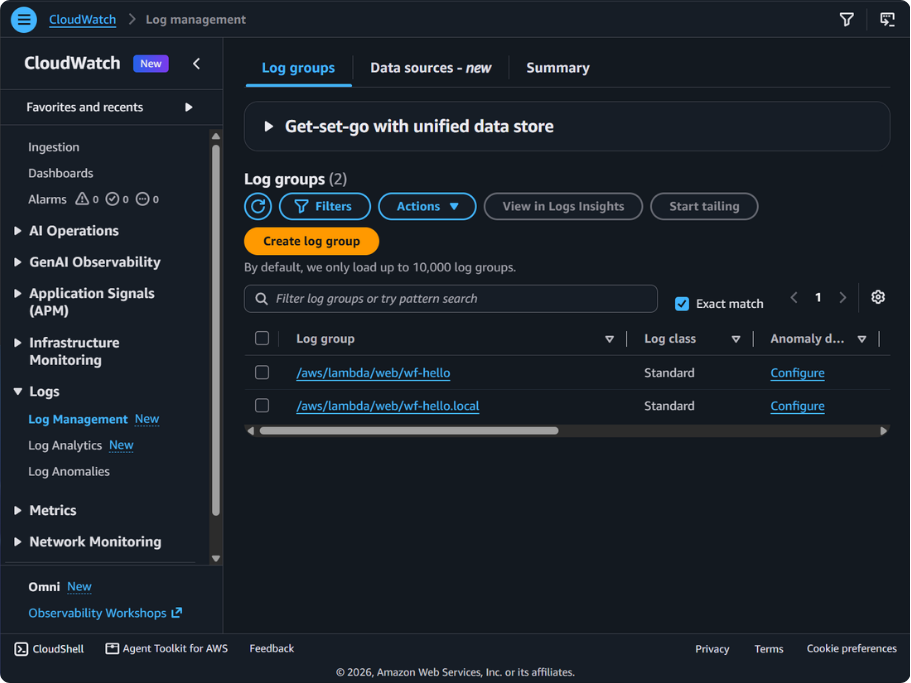
- Open
/aws/lambda/web/wf-hello. - Open the stream that starts with
lambda-web-logstreamfrom Prove (centralized names may append-<account>-<region>). - Confirm listen + platform init:
{"timestamp":"2026-10-14T17:49:45.797Z","level":"INFO","message":"listening on port 3000","region":"us-east-1"}{"timestamp":"2026-10-14T17:49:45.605Z","level":"INFO","type":"platform.initStart","region":"us-east-1","record":{"runtimeVersion":"nodejs24.x:nodejs.web24.v30","runtimeVersionArn":"arn:aws:lambda:us-east-1::runtime/nodejs24.x/version/nodejs.web24.v30","functionName":"wf-hello","revisionId":"rev-3tmf9","instanceId":"1bbd009e-122b-40ff-9821-767aeb76a3ca","initializationType":"native-http"}}{"timestamp":"2026-10-14T17:49:45.801Z","level":"INFO","type":"platform.initReport","region":"us-east-1","record":{"status":"success","instanceId":"1bbd009e-122b-40ff-9821-767aeb76a3ca","initializationType":"native-http","metrics":{"totalDurationMs":271.000,"totalCpuTimeMs":195.000,"maxMemoryUsageMb":160}}}Or:
aws logs filter-log-events \ --log-group-name /aws/lambda/web/wf-hello \ --log-stream-name-prefix '2026/10/14/wf-hello[rev-3tmf9]d01c191445d04913a18e4a3c720fac66' \ --region us-east-1Hello World does not log each request. Correlate with log stream + those
lines. lambda-web-request-id appears on console output when your app logs
(structured logs).
Optional: Express and CLI. Else Teardown.